

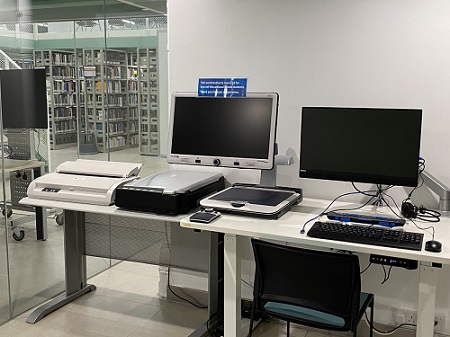
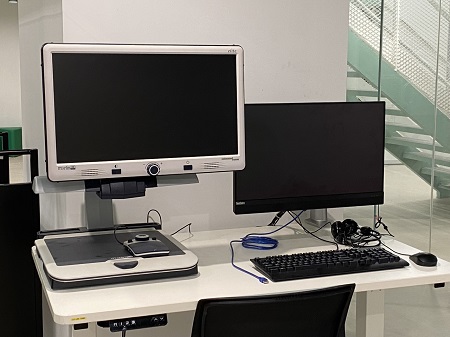
To meet the learning needs of students with Special Educational Needs (SEN), the Library has provided the following SEN equipment:
Equipment for checkout
| Hardware | Details |
|---|---|
| Compact 7 HD | Compact 7 HD is a truly portable 7-inch widescreen electronic video magnifier. |
| OrCam MyEye | OrCam MyEye is a wearable, voice-activated visual impairment device that instantly reads text from any book & screen. |
| Scanmarker Air | Scanmarker Air is a portable device for scanning wirelessly via a Bluetooth connection to a computer, smartphone or tablet. |
Equipment installed at 1/F of the Library
| Software/ Hardware | Details |
|---|---|
| Screen Reader: JAWS (Job Access with Speech) NVDA HK edition |
JAWS can turn screen content to voice or braille and automatically do OCR for PDF files. NVDA is a screen-reading software that accommodates the needs of Chinese users |
|
Windows Built-in Accessibility Features (link) |
There are several built-in features in Windows to support productivity, creativity, and ease of use for everyone including areas such as vision, hearing, dexterity and screen reader, etc |
| Input Method: BRITE |
BRITE is a multi-functional Braille translation editing program which allows people to easily perform two-way instant translation between Braille and regular text |
| Braille Display: Focus 40 Blue Braille display |
The braille display is an electro-mechanical device for displaying braille characters which can be used to read the contents of a computer. It works with screen reader software likes JAWS or NVDA |
| Book Scanner: Plustek OpticBook A300 |
The Book Scanner is designed for scanning books for OCR and is used with any text-to-speech software |
| Height-adjustable Desk & Flexi monitor arm: Freemax E11desk |
The electrically height-adjustable desk is designed to fit users with different levels of wheelchairs. The Flexi-monitor arm facilitates the different positions for the computer monitor |
| Polarizing Light | Polarizing Light reduces glare on surfaces and the LED bulb is anti-flicker |
Booking & Rules
Priority will be given to our Library users with SEN. Please reserve the equipment through the Library Room/Facilities Booking System. Below are the booking rules for the SEN equipment:
| Eligible Users: | Staff and Student (Users with Special Educational Needs will always have priority to use the equipment) |
| Quota: | 2 sessions per day (maximum 3 hours per session) |
|
|
In addition, users with SEN can approach the Service Counter for assistance in checking in and out of the library materials, book searching, and retrieval. Library tours can also be arranged.